
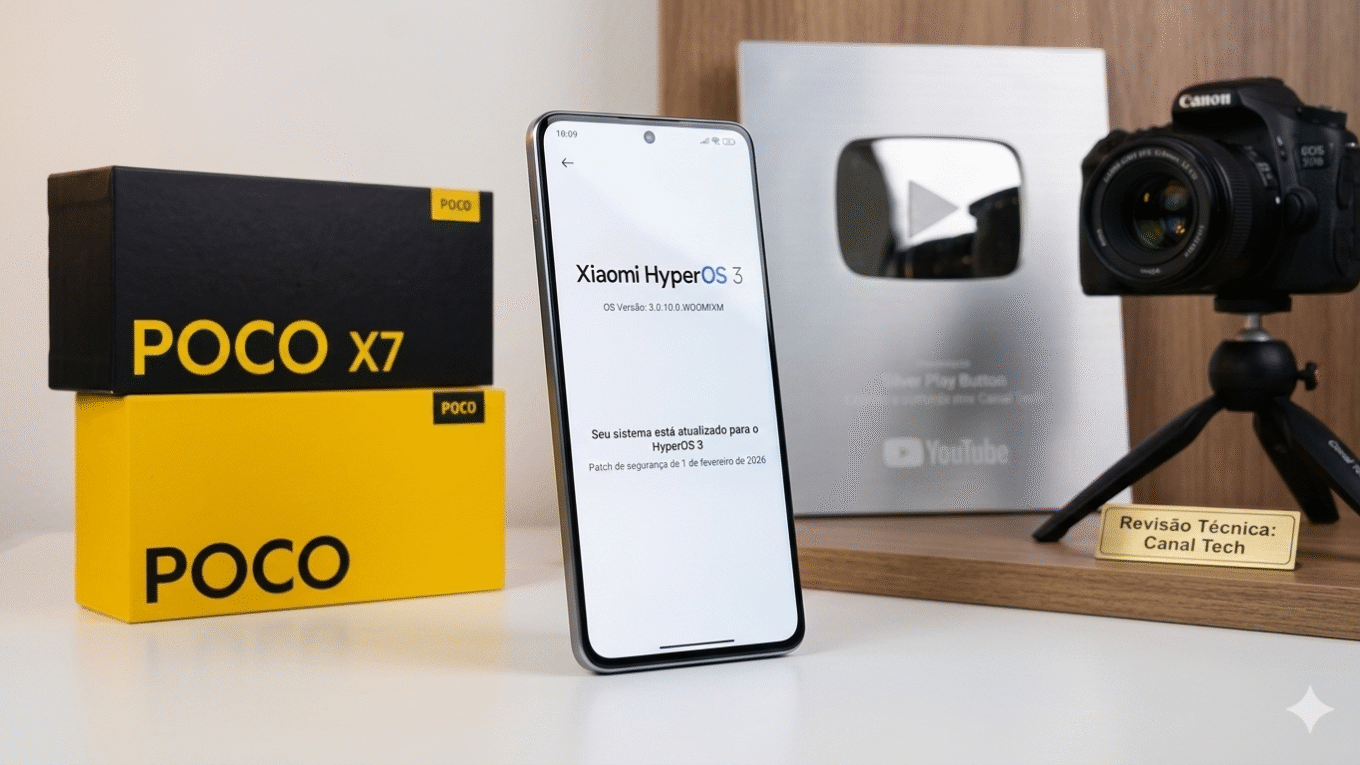
How to Fix Any Bug After an OTA Update in HyperOS 3 | The Correct Step-by-Step Method
You just received a notification, tapped “Install,” and let your Xiaomi run its OTA update overnight. A day or two later, the phone is running hotter than usual, notifications are misfiring, or the control center keeps glitching. Your immediate instinct might be to wipe the device and start fresh — but that’s the last thing you should do.
HyperOS 3 bugs and overheating after OTA updates have a very specific technical cause, and there’s a clean, data-safe solution that most users never find out about. This evergreen guide walks you through exactly what’s happening and how to fix it the right way — no factory reset required.
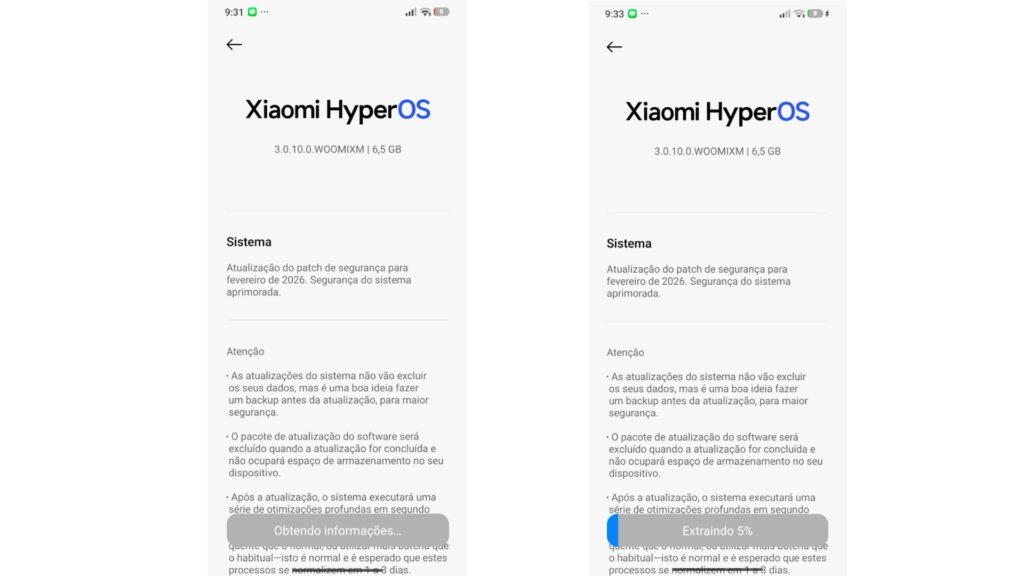
Why OTA Updates Cause Bugs and Overheating in HyperOS 3
OTA stands for Over The Air — it’s the type of update that arrives as a small push notification directly to your device. The key word is small. A typical HyperOS 3 OTA package can weigh as little as 72 MB, while the full ROM for the same version can exceed 6.5 GB.
That enormous size difference is the root of the problem. An OTA package is incremental — it only delivers the files that changed between your current version and the new one. When the previous installation had any inconsistencies, or when the old residual files conflict with the new fragments introduced by the OTA, the result is system instability: excessive heat, broken notifications, control center failures, and general sluggishness.
This is especially common on devices transitioning from Android 15 to Android 16 — the foundation of HyperOS 3 — because the structural differences between the two Android versions are significant, making file conflicts far more likely during an incremental update.
How Long Should You Wait Before Acting?
Before touching anything, give the system time to breathe. After installing an OTA update, HyperOS runs a series of background optimization processes — app recompilation, cache reorganization, and performance calibration — that can take several days to complete.
The recommended testing window is two to three days of normal use. During that period:
- Keep the device on the default system theme — third-party themes are one of the leading causes of post-update instability in HyperOS 3
- Monitor heat levels, notification reliability, and overall responsiveness
- Avoid installing multiple new apps simultaneously, which can mask or compound system issues
If problems persist beyond that window, it’s time to apply the correct fix.
How to Fix HyperOS 3 Bugs After OTA — Without a Factory Reset
The solution is to download and install the full ROM package of the same version you already have installed via OTA. By replacing the fragmented incremental files with a complete, clean set of system files, the device resolves internal conflicts without touching any personal data.
Step-by-Step Instructions:
Step 1 — Open system update settings Go to Settings > About Phone > MIUI / HyperOS Version.
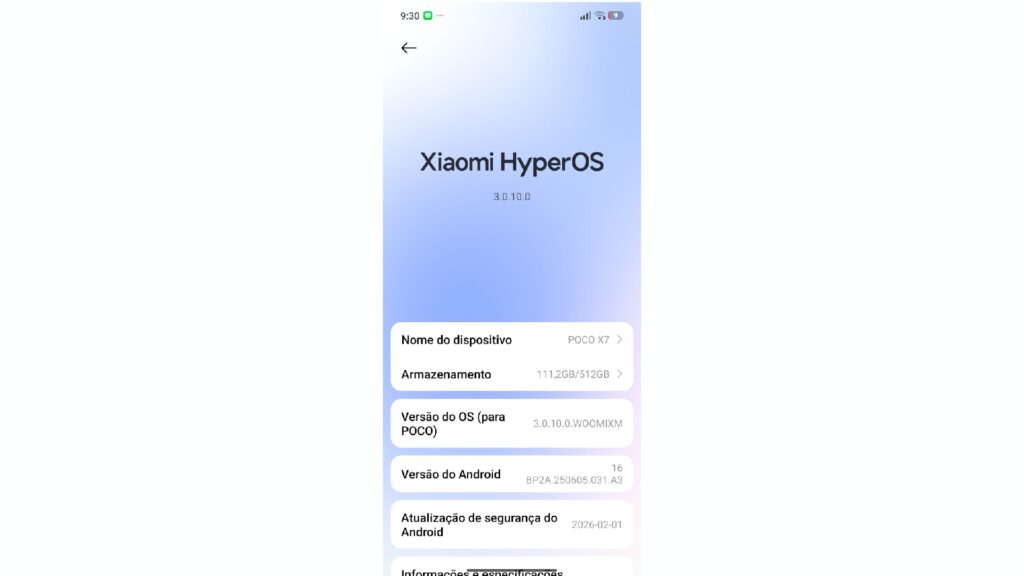
Step 2 — Tap the HyperOS logo On the update screen, tap directly on the HyperOS logo at the top of the page.
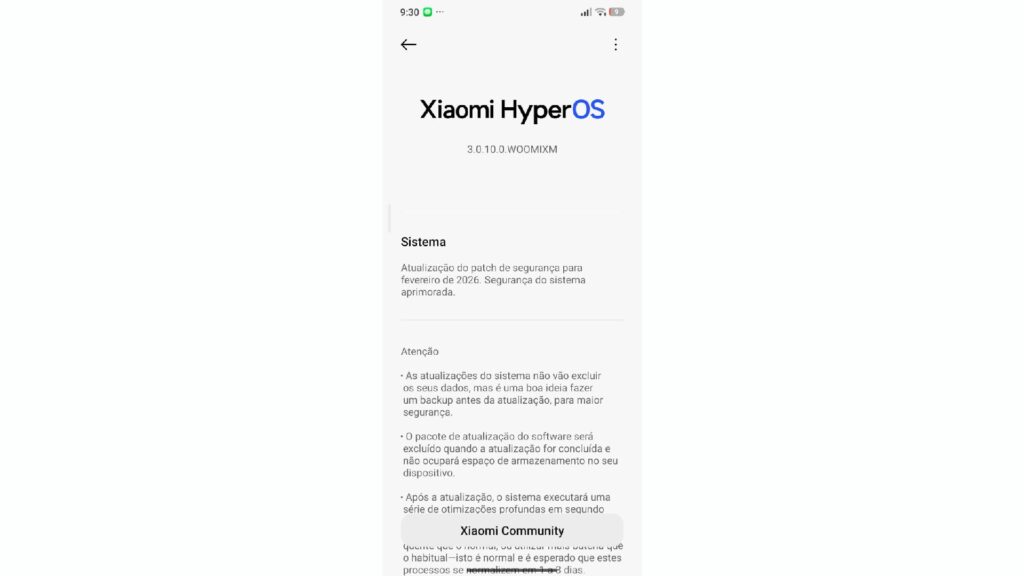
Step 3 — Open the options menu Tap the three-dot menu in the upper right corner of the screen.
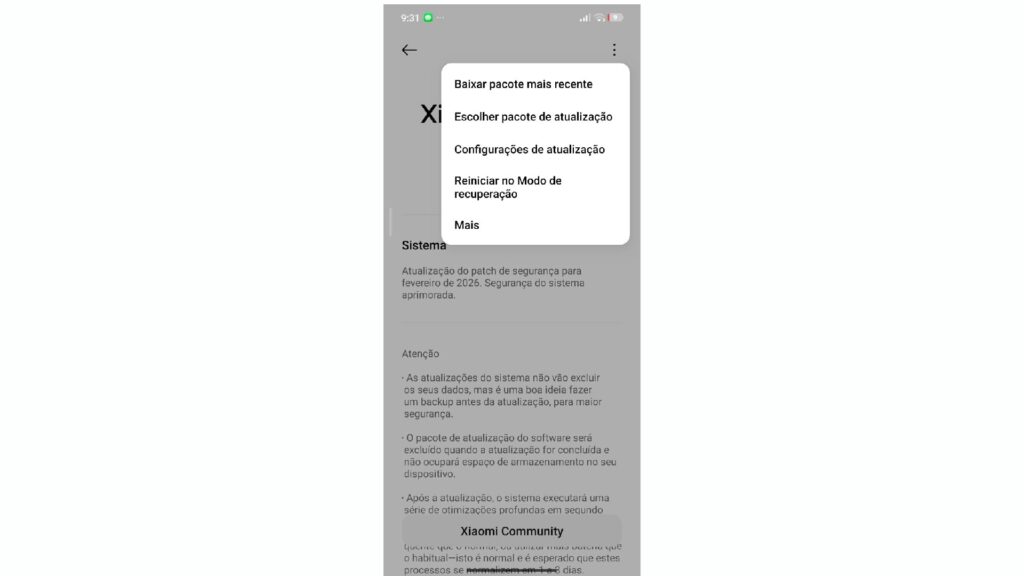
Step 4 — Select “Download full update package” This is the critical option. It differs from the manual package option — this one automatically fetches the full ROM for your current version directly from Xiaomi’s servers.
Step 5 — Download over Wi-Fi The full package is typically 6 to 7 GB. Make sure you’re connected to a stable Wi-Fi network before starting.
Step 6 — Install and allow the device to stabilize The system will install the complete package and reboot. After the restart, allow several hours before evaluating results — background optimization needs to run again.
Key fact: This process replaces system files only. Your personal data, apps, photos, and settings are completely preserved. It works on devices with 64 GB, 128 GB, or more of internal storage — the package replaces the existing installation, it doesn’t add on top of it.
Full Comparison Table: OTA Package vs. Full ROM Package in HyperOS 3
| Feature | OTA (Incremental) Package | Full ROM Package |
|---|---|---|
| Typical size | 50 MB – 200 MB | 5 GB – 7 GB |
| How it arrives | Automatic push notification | Manual download via settings menu |
| What it replaces | Only modified files | All system files |
| Risk of file conflicts | High (when residual issues exist) | Very low |
| Erases personal data | No | No |
| Best used when | System is clean and stable | Bugs persist after OTA install |
| Download time | A few minutes | Depends on connection speed |
| Real example | Poco X7 HyperOS 3 v0.10.0 — 72 MB via OTA | Same version full ROM — 6.5 GB |
The Hidden Role of Third-Party Themes in Post-OTA Bugs
One factor that catches many users off guard: custom themes are among the most common triggers of instability after an OTA update. HyperOS 3, particularly in its Android 16-based builds, introduced significant structural changes to the UI layer. Themes built for earlier versions of the OS can conflict directly with these new system elements.
Users running third-party themes frequently reported notification center glitches, broken animations, and higher-than-normal battery drain after OTA installs — issues that disappeared immediately upon switching back to the default theme.
The correct post-OTA sequence is:
- Switch to the default system theme
- Test for two to three days
- Install the full package only if problems persist
- Reapply custom themes only after confirming full system stability
When the Bug Is in the Build — Not Your Installation
Not every post-OTA problem can be solved at the device level. Some bugs are embedded in the HyperOS 3 build itself and won’t be resolved until a new version is released. In those cases:
- Installing the full package won’t help — the issue lives in the codebase, not the installation process
- The correct path is submitting feedback through the system update center so Xiaomi’s development team can identify and patch it
- Following specialized update-tracking channels is the most reliable way to know when a fix goes live
If issues persist after the full package installation and a proper stabilization period, this is almost certainly what’s happening.
Context: Understanding How HyperOS Builds Reach Your Device
Knowing how Xiaomi distributes its updates helps set realistic expectations after any OTA install. Before a build ever reaches you as an automatic notification, it has already gone through internal testing, a closed Mi Pilot beta phase, and a staged public rollout — typically starting with a limited percentage of devices before expanding globally. If you’re the type of user who wants to receive updates before the general public and actively contribute to shaping the system’s stability, Xiaomi’s early access program is worth understanding. Learn everything about how the selection process works and which devices are currently eligible in the complete guide to HyperOS Early Access and Beta Updates.
What to Do When the OTA Update Simply Won’t Install
Beyond post-install bugs, a separate category of problem affects users who can’t get the update to install in the first place. Regional code mismatches, security patch conflicts, and version incompatibilities frequently block OTA updates with cryptic error messages — including the dreaded “available for internal testers only” screen. Each Xiaomi, POCO, and Redmi device carries a regional identifier that must match the ROM being pushed. Understanding those codes, and knowing how to manually install any HyperOS 3 ROM when the automatic process fails, is covered in full detail at How to Force HyperOS 3 on Any Xiaomi Device.
Your Device’s Update Deadline — Why It Matters Now
There’s a broader reason to stay on top of every available OTA and full package update: software support deadlines. Every Xiaomi, POCO, and Redmi device has a defined end-of-support date after which security patches and major Android version upgrades stop arriving entirely. For budget and mid-range models especially, that date can be closer than users expect. Understanding when your device stops receiving HyperOS updates isn’t just about curiosity — it directly affects your phone’s security posture and long-term usability. Check the full support timeline for your device in our dedicated article on Xiaomi HyperOS Update Deadlines for 2026.
Is Your Device on the Android 17 List?
With HyperOS 3 now rolling out broadly, the conversation is already shifting toward what comes next. Xiaomi has confirmed that more than 70 devices across the Xiaomi, POCO, and Redmi lines will receive the Android 17 update packaged as HyperOS 3.1 and the future HyperOS 4. Premium lines like the Xiaomi 15 series and POCO F7 are naturally at the top of that list, with mid-range and budget models following in subsequent waves. Knowing whether your device is included — and in which region it tends to receive updates first — is key to planning ahead. See the complete confirmed device list in our coverage of Android 17 Coming to Over 70 Xiaomi Devices.
Quick Reference: Key Facts About HyperOS 3 OTA Bugs
- OTA bugs are caused by file conflicts between the incremental package and residual files from the previous system version
- Wait 2–3 days before taking action — the system needs that window to complete background optimization
- Use the default theme during the testing period to eliminate theme-related conflicts as a variable
- The full ROM package resolves conflicts by replacing all system files cleanly, not just the modified ones
- No personal data is lost during a full package installation — apps, photos, contacts, and settings remain intact
- Devices with 128 GB don’t need extra free space — the package replaces the existing installation, not stacks on it
- If bugs persist after the full package, the issue is in the build itself and requires official feedback for correction in the next release
- Third-party themes are a leading hidden cause of post-OTA instability in HyperOS 3 specifically
- China region devices tend to receive new builds first, followed by Global, then regional variants like EEA and India
- No factory reset is needed for any of the standard post-OTA bug scenarios described in this guide
Conclusion
Getting a new OTA notification is exciting — but running into bugs right after is frustrating, and the instinct to factory reset the device is understandable. The good news is that the vast majority of overheating, notification failures, and system glitches in HyperOS 3 after OTA updates can be fully resolved by installing the full ROM package of the same version. It cleans up the file conflicts at the root of the problem without touching a single byte of your personal data.
The sequence is simple: wait two to three days on the default theme, then download and install the full package if issues remain. If the problem still doesn’t clear up after that, you’re dealing with a build-level bug — and the right move is submitting feedback and monitoring update channels for the patch.
Want to stay ahead of every HyperOS update as it lands? Check our real-time tracker and see which devices in your region are next in the rollout queue — start with our guide on Android 17 Coming to Over 70 Xiaomi Devices.
FAQ — HyperOS 3 OTA Bug Fix: Common Questions
1. Why is my Xiaomi overheating after a HyperOS 3 OTA update? Overheating after OTA is caused by file conflicts between the partial package and old system files. Install the full ROM to fix it.
2. Do I need to factory reset my phone to fix bugs after an OTA update? No. A factory reset is unnecessary. Installing the full package of the same version resolves the issue without erasing your data.
3. Will the full ROM package delete my apps and photos? No. The full package replaces only system files. All personal data, apps, and settings remain completely untouched.
4. What’s the difference between an OTA package and a full HyperOS 3 ROM? OTA packages are incremental (50–200 MB) and only update changed files. The full ROM (5–7 GB) replaces the entire system cleanly.
5. How long should I wait for HyperOS 3 to stabilize after an OTA install? Allow 2–3 days of normal use before applying any fix. The system needs that time to complete background optimization processes.
6. Can a custom theme cause bugs after a HyperOS 3 OTA update? Yes. Third-party themes frequently conflict with post-OTA system changes. Switch to the default theme before troubleshooting anything else.
7. What if bugs persist even after installing the full ROM package? If problems remain, the issue is a build-level bug. Submit feedback through the update center and wait for the next corrective release.
8. Does this fix work for POCO X6 5G, POCO X7, and POCO C85? Yes. The full package method works on all Xiaomi, Redmi, and POCO devices running HyperOS 3, regardless of model or region.
Stay updated on every HyperOS release the moment it drops:
- Telegram — TECnoVAs Official: https://t.me/TECnovas_oficial
- Twitter / X — @HyperOSNews: https://x.com/HyperOSNews

Valberth Vas, the expert behind TecnoVas Innovate, is the author of the company’s reviews and guides. His vast experience in the world of technology, with a particular focus on Xiaomi’s innovations, allows him to offer in-depth insights and clear guidance on the current technological landscape.