
Finally! How to Force HyperOS 3 on Unsupported Xiaomi ROMs (2026 Guide)
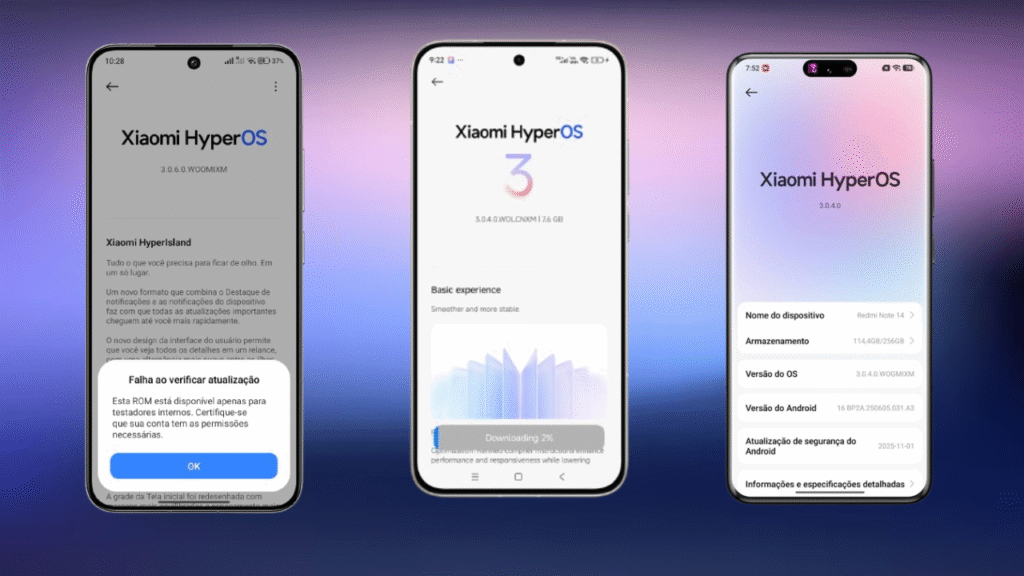
You tried updating your Xiaomi to HyperOS 3 and got blocked. The screen shows “available only for internal testers” and you’re stuck. Your friend updated fine, but yours won’t budge.
This happens to thousands of Xiaomi users every single day. You’re not doing anything wrong. The system blocks certain updates based on your device region and testing status.
How to force HyperOS 3 on your Xiaomi requires understanding three critical things: your device’s regional code, the type of ROM you downloaded, and your beta testing status. Get one wrong and the installation fails every time.
I’ll walk you through every method available in 2026. You’ll learn why errors happen and how to fix them permanently. No technical jargon, just clear steps anyone can follow.
The Poco X7 and Redmi Note 14 Pro 5G currently receive version 0.7.0 with December 2025 security patch. But not everyone can install it. There’s a specific reason for this blocking mechanism.
In this guide, you’ll discover the difference between Mi Pilot, staged rollout, and public release. You’ll identify your device region and manually update any compatible ROM. By the end, you’ll control your update schedule instead of waiting for OTA notifications that never arrive.
Understanding Xiaomi Regional Codes and Their Impact
Every Xiaomi device carries a regional identifier that controls update availability. This code appears in your system version and determines which ROM files your phone accepts.
Think of regional codes like postal zip codes. Just as mail only goes to valid addresses, ROM updates only install on matching regions. Your device won’t accept a European ROM if it’s configured for the global market.
The MIXM region represents the standard global variant, most common in North and South America. The EUXM region covers European devices, which often receive updates first. Taiwan uses TWXM, Indonesia uses IDXM, Russia operates on RUXM, Turkey on TRXM, and India on INXM.
To find your region code, open Settings and navigate to About Phone. Tap on MIUI Version or HyperOS Version. Look at the final four letters after the number sequence. Those letters define your regional assignment.
The Poco X7 and Redmi Note 14 Pro 5G share identical internal codenames. This means ROM files are cross-compatible between these two models. A file made for one works perfectly on the other.
Why Regional Codes Matter for Updates
Xiaomi releases updates to different regions at different times. The global standard region usually gets priority, but European variants sometimes receive earlier access for testing purposes.
Downloading a ROM from the wrong region wastes your time and data. The system automatically blocks installation when it detects a region mismatch. This security measure prevents software conflicts and potential device damage.
Regional codes also affect warranty status and service availability. Some regions have different legal requirements for software features, which is why Xiaomi maintains strict separation between markets.
Knowing your exact region eliminates guesswork when searching for compatible updates. You focus only on ROM files that actually work with your device, saving hours of frustration and multiple failed installation attempts.
Three Types of HyperOS 3 Updates You Need to Know
Xiaomi distributes HyperOS updates through three distinct channels. Each channel has different access requirements and installation rules. Understanding these differences prevents most common update errors.
Most people try installing the wrong update type without realizing it. They download from Telegram channels that don’t specify the ROM category. Then they wonder why installation fails with cryptic error messages.
Mi Pilot Internal Testing ROMs
Mi Pilot represents Xiaomi’s internal testing program. Only approved beta testers can install these early-access builds. The system checks your tester status before allowing installation.
When you try installing a Mi Pilot ROM without approval, you see: “available only for internal testers.” This isn’t a bug or glitch. It’s a deliberate security block protecting unstable software from reaching regular users.
Getting Mi Pilot access requires joining the Xiaomi Community app and applying to the beta program. You fill out a questionnaire about your technical experience and wait for approval. The company reviews applications and selects participants based on device activity and community engagement.
Once approved, your status shows green in the Community app. Then you can manually install any Mi Pilot ROM following standard installation procedures. The system recognizes your tester credentials and allows the update to proceed.
Staged Rollout Updates with 24-Hour Windows
Staged rollouts target specific user groups in waves. Selected users receive OTA notifications automatically. These updates also allow manual installation, but only for 24 hours after release.
Here’s the critical detail most people miss: you have exactly 24 hours from release time to manually install a staged ROM. After that window closes, manual installation gets blocked. Only users selected for OTA receive the update afterward.
If you download a staged ROM today at 2 PM, you must install it before 2 PM tomorrow. Miss that deadline and the file becomes useless for manual installation. The system timestamp verification prevents late installations.
Many people download staged ROMs and save them for later. Days later they try installing and face rejection errors. The 24-hour window already expired. They needed to act immediately or wait for the next release phase.
Public Release Updates
Public releases open to everyone without restrictions. No beta tester status required. No time windows to worry about. Any user can download and install at their convenience.
You download the public ROM, place it in your device’s root folder, and install normally. The system accepts it without checking testing credentials or timestamps. This is the safest and simplest update method.
Public releases come last in Xiaomi’s rollout strategy. First Mi Pilot tests for major bugs. Then staged rollout checks stability with real users. Finally, public release ensures everyone gets a stable, tested version.
Patience pays off with public releases. Early adopters face bugs that later get fixed. Public release users get the refined, polished version with fewer issues and better stability.
How to Manually Install HyperOS 3 on Your Xiaomi
Manual installation gives you complete control over the update process. You don’t wait for OTA notifications that might never arrive. You choose when and which version to install.
First, download the correct ROM file for your specific region. Use only trusted sources that clearly label the update type. You can track real-time updates through the HyperOS 3 Global Update Tracker, which monitors all regions and devices.
After downloading completes, the file sits in your Downloads folder. You must move it to your device’s root storage directory. This step is crucial because the system only recognizes ROMs in the root location.
Step-by-Step Manual Installation Process
Open your phone’s file manager app. Navigate to the Downloads folder and locate your ROM file. It should be 4-6GB in size with a .zip extension.
Long-press the ROM file and select Move from the menu. Choose Internal Storage as the destination. Don’t select any subfolder. Drop the file directly in the root directory where you see folders like DCIM, Download, and Android.
Now go to Settings and scroll down to About Phone. Find the HyperOS Version line. Tap it repeatedly about seven times until additional options activate. A message confirms developer options are now available.
Three dots appear in the top-right corner of the About Phone screen. Tap those dots and select “Choose update package” from the dropdown menu.
The file browser opens at your root storage directory. You should see your ROM file listed there. Tap it once to select. The system reads the file information and verifies compatibility.
Several messages might appear at this point. “Available only for internal testers” means you lack Mi Pilot approval. “Unofficial ROM” means your device isn’t enrolled in beta testing. “Update failed” indicates region mismatch or corrupted download.
When verification succeeds, an Install button appears. Tap it and confirm. The installation process takes 5-10 minutes. Your phone reboots several times automatically. Don’t interrupt this process or remove the battery.
Alternative Method: Region Switching for Updates
Another approach involves changing your device’s regional settings temporarily. This tricks the system into checking for updates from different geographic markets.
Open Settings and search for “Region” in the search bar. Change your selection to India, Russia, or Turkey. These regions often receive updates at different times than the global market.
After changing region, go to About Phone and tap “Check for updates.” If that region has an available update, it shows up immediately. You can install it directly via OTA without manual file handling.
Once updated, switch your region back to your actual location. The system keeps the installed version. This method works best with public release updates. Mi Pilot and staged ROMs still require proper credentials.
Region switching has limitations. Some updates are region-locked at the device level, not just the software level. Changing settings won’t bypass hardware-based restrictions on certain models.
Becoming an Official Xiaomi Beta Tester
Beta testing unlocks early access to every ROM release. You install updates weeks before general availability. But it requires official approval from Xiaomi’s testing program.
The application process is straightforward but selective. Not everyone who applies gets accepted. Xiaomi prioritizes active users with clean device histories and community participation.
Beta Program Application Requirements
Open the Xiaomi Community app on your device. It comes pre-installed on all Xiaomi phones. If you removed it, download it again from Google Play Store.
Tap the menu icon and look for “Beta Testing” or “Recruitment” sections. Available devices for testing appear in a list. Find your specific phone model.
Each device listing shows current recruitment status. Some programs stay open continuously. Others close when enough testers join. Newer devices typically have more open spots than older models.
Tap your device to view the application form. The questionnaire asks about your technical knowledge, daily phone usage, and willingness to report bugs. Answer honestly because Xiaomi reviews responses carefully.
What Happens After Applying
The approval process takes anywhere from three days to several weeks. Xiaomi evaluates your device usage patterns, community activity level, and questionnaire responses.
Active community members who frequently use their devices get priority. If you just bought your phone yesterday and never opened the Community app before, chances of immediate approval are lower.
When approved, your status changes to green with “Approved” displayed clearly. This certification appears on your profile and the recruitment page. You now have permanent Mi Pilot installation rights for that specific device.
With active beta status, you can manually install any Mi Pilot ROM using the installation method I described earlier. The system recognizes your credentials and allows the update to proceed without blocking messages.
The Poco F5 is currently in final testing phases and should receive HyperOS 3 soon, demonstrating Xiaomi’s commitment to supporting even previous-generation devices with the latest software.
Why Your HyperOS 3 Installation Fails
The most common error message is “failed to verify update” or “available only for internal testers.” Two main causes trigger these errors consistently.
First cause: attempting to install a Mi Pilot ROM without approved beta tester status. The system blocks unauthorized access automatically. No workarounds exist for this security measure.
Second cause: trying to install a staged rollout ROM after the 24-hour window expired. The timestamp verification fails and installation gets rejected. You needed to act within the allowed timeframe.
Many Telegram channels share ROM files without identifying the type. You download thinking it’s public release. During installation you discover it requires beta credentials you don’t have.
Always use trusted sources that clearly label ROM types. Legitimate communities specify whether updates are Mi Pilot, staged rollout, or public release. This information saves you from wasted downloads and failed installations.
Security Patch Conflicts and Version Mismatches
Another frequent problem involves security patch conflicts between versions. This happened recently when users tried jumping from HyperOS 2.2 to HyperOS 3.
People who updated to version 2.2 with November patch couldn’t install version 3.0. The system detected a security conflict and blocked installation for safety reasons.
Xiaomi released a second version of 3.0 specifically addressing this conflict. But users who waited avoided the headache entirely. The revised version installed cleanly without patch-related errors.
These temporary conflicts resolve quickly. The company always releases corrected versions within days. Following update communities helps you know when it’s safe to proceed versus when you should wait.
Currently, 34 Xiaomi devices are confirmed to receive HyperOS 3 in January 2026, including popular models like Poco F5, Redmi Note 13 Pro, and others from the global lineup.
Region Code Verification Failures
Sometimes installation fails because you downloaded a ROM for the wrong region. The system performs region verification before allowing updates to proceed.
If your device is MIXM and you download EUXM ROM, installation fails immediately. The error message might not explicitly state “wrong region,” but that’s the underlying cause.
Double-check the ROM filename before downloading. The region code appears clearly in properly labeled files. Match it exactly to your device’s regional identifier.
Mixing regions can cause serious problems beyond simple installation failure. Some region-specific features might break. Warranty status could be affected. Always stick to your device’s designated region.
Comparing HyperOS 3 Builds: What Changed Between Versions
Build 0.6.0 includes the November 2025 security patch. Build 0.7.0 contains the December 2025 patch. Security patches fix Android system vulnerabilities discovered each month.
More recent patches provide better protection against newly discovered threats. Running December patch is objectively safer than November patch. The difference matters for security-conscious users.
Beyond security, each build brings performance improvements. Version 0.7.0 runs more stable than 0.6.0 in several key areas. Early testers reported better battery life and smoother animations.
These incremental improvements seem small individually. Together they significantly impact daily user experience. Apps launch faster. Multitasking feels more responsive. Battery lasts longer throughout the day.
We’re currently awaiting the January 2026 security patch. It should arrive within the next few weeks for priority devices. The Poco X6 Pro already received its update with January 2026 patch, showing Xiaomi’s commitment to keeping the Poco lineup current.
Regional Release Priority Patterns
European and global standard (MIXM) regions lead in update availability. They’ve already received multiple builds of version 0.7.0. This pattern holds consistent across most major releases.
Poco X7 and Redmi Note 14 Pro 5G receive global priority treatment. They already have two or three available versions depending on region. Xiaomi focuses resources on flagship and high-volume models first.
Other models like Poco X6 5G remain on first-release versions. The company validates stability through multiple rounds before expanding availability. This cautious approach prevents widespread issues.
Smaller regions like Turkey, Indonesia, and Taiwan receive updates later in the cycle. This is standard procedure in Xiaomi’s rollout timeline. Eventually all regions get the same version, just at staggered intervals.
HyperOS 3 vs HyperOS 2: Real-World Differences
HyperOS 3 brings noticeable visual refinement compared to version 2. The redesigned home screen icons look sharper with better detail. The overall interface feels more polished and cohesive.
Performance improvements center on three areas: compiler optimization, memory management, and graphics rendering. The system allocates memory more efficiently, leaving more RAM available for apps.
Battery life improved through better short-video playback optimization and refined frequency scheduling. Users report 10-15% better battery endurance compared to HyperOS 2 in real-world testing.
The new Xiaomi HyperIsland notification system replaces the older notification spotlight. It combines device notifications and important updates in one expandable interface. You can pull down to expand small windows and handle multiple tasks simultaneously.
Stability is where HyperOS 3 shines brightest. Early builds of HyperOS 2 suffered from random app crashes and occasional system freezes. Version 3 resolves most of these issues through improved system architecture.
Animation smoothness received particular attention. Xiaomi fine-tuned over 100 system scenes for more natural motion. Transitions between apps, opening folders, and switching tasks all feel more fluid.
What You Lose vs What You Gain
Some users report slightly higher initial battery drain during the first 48 hours after updating. This is normal as the system reindexes files and optimizes background processes. Battery life normalizes after this break-in period.
Certain third-party apps show compatibility issues with HyperOS 3 initially. Banking apps and some games need updates from their developers. Most major apps already released compatible versions.
The redesigned UI changes muscle memory for long-time Xiaomi users. Settings moved to different locations. Some features have new names. Adaptation takes a few days but ultimately the new organization makes more sense.
In exchange, you gain significantly improved privacy controls with post-quantum encryption. Enhanced data protection keeps personal information more secure against emerging threats. The privacy features received a complete redesign with a cleaner interface.
System apps like Gallery, Weather, Calendar, and Recorder all got meaningful upgrades. Gallery widgets let you pin favorite albums. Calendar adds week view for better schedule visualization. Recorder includes smart noise reduction for clearer playback.
Safe ROM Download Practices for 2026
Never download ROMs from unknown websites or random Telegram groups. Modified files might contain malware or cause serious system damage. Security should always be your first priority.
Use only established sources with thousands of active members. Legitimate channels clearly identify ROM types (Mi Pilot, Staged, or Public). If the source doesn’t specify update type, skip it entirely.
Verify file sizes before installing. Complete HyperOS 3 ROMs range from 4GB to 6GB typically. Files significantly smaller might be repackaged or corrupted. Suspiciously small downloads often indicate problems.
Check MD5 or SHA256 hash values when available. These cryptographic checksums verify file integrity. Compare the hash of your download against the official hash provided by trusted sources.
Trusted Sources for Xiaomi Updates
Brazilian communities specializing in Xiaomi devices offer reliable downloads. Groups with active moderators and clear rules tend to be safer. Look for communities with established reputations and transparent practices.
Specialized tracking websites that monitor official Xiaomi updates provide safe alternatives. These sites compile information directly from Xiaomi’s servers. They don’t modify files or inject additional content.
The official Xiaomi Community app notifies you about new releases. But it only shows versions officially released for your device and region. You won’t see beta or staged updates unless you qualify for them.
International forums like XDA Developers maintain dedicated Xiaomi sections. Experienced members share ROMs and provide detailed technical discussions. These communities have strict quality standards and ban malicious uploads.
Avoid websites promising “modified ROMs with extra features.” These modifications usually cause more problems than benefits. Stick with official Xiaomi releases for reliability and security.
To stay updated on all releases, the HyperOS 3 Global tracker is available for multiple Xiaomi devices, with constant updates being released for different regions.
Complete HyperOS 3 Regional Code Reference Table
| Device | Regional Code | HyperOS 3 Version | Security Patch | Status | Update Type |
|---|---|---|---|---|---|
| Poco X7 | MIXM | 0.7.0 | December 2025 | Available | Public Release |
| Poco X7 | EUXM | 0.7.0 | December 2025 | Available | Public Release |
| Poco X7 | INXM | 0.6.0 | November 2025 | Available | Mi Pilot |
| Poco X7 | TWXM | 0.6.0 | November 2025 | Available | Staged Rollout |
| Poco X7 | IDXM | 0.6.0 | November 2025 | Available | Staged Rollout |
| Poco X7 | RUXM | 0.6.0 | November 2025 | Available | Staged Rollout |
| Poco X7 | TRXM | 0.6.0 | November 2025 | Available | Staged Rollout |
| Redmi Note 14 Pro 5G | MIXM | 0.7.0 | December 2025 | Available | Public Release |
| Redmi Note 14 Pro 5G | EUXM | 0.7.0 | December 2025 | Available | Public Release |
| Redmi Note 14 Pro 5G | INXM | 0.6.0 | November 2025 | Available | Mi Pilot |
| Redmi Note 14 Pro 5G | TWXM | 0.6.0 | November 2025 | Available | Staged Rollout |
| Redmi Note 14 Pro 5G | IDXM | 0.6.0 | November 2025 | Available | Staged Rollout |
| Redmi Note 14 Pro 5G | RUXM | 0.6.0 | November 2025 | Available | Staged Rollout |
| Redmi Note 14 Pro 5G | TRXM | 0.6.0 | November 2025 | Available | Staged Rollout |
| Poco X6 5G | MIXM | 0.6.0 | November 2025 | Rolling Out | Staged Rollout |
| Poco X6 5G | EUXM | 0.6.0 | November 2025 | Rolling Out | Staged Rollout |
| Poco X6 Pro | MIXM | 0.7.0 | January 2026 | Rolling Out | Pending Release |
| Poco X6 Pro | EUXM | 0.3.0 | February 2026 | Rolling Out | Public Release |
| Poco F5 | MIXM | 0.6.0 | December 2025 | Internal Testing | Internal Testing |
| Poco F5 | EUXM | 0.6.0 | December 2025 | Internal Testing | Internal Testing |
| Redmi Note 13 Pro | MIXM | 0.7.0 | December 2025 | Available | Public Release |
| Redmi Note 13 Pro | EUXM | 0.7.0 | December 2025 | Available | Public Release |
Essential Pre-Update Precautions
Always backup your complete data before any system update. Use Mi Cloud or Google Drive for automatic cloud backup. Don’t skip this step even if you’re confident in the process.
Ensure battery level exceeds 50% before starting installation. Updates consume significant power. If your phone dies mid-installation, you risk serious system corruption.
Connect to stable Wi-Fi before downloading ROM files. These files are several gigabytes large. Using mobile data costs money and increases failure risk from connection drops.
Read user reports from people who already installed the version you’re targeting. Community forums always discuss bugs and known issues. Five minutes of reading can save hours of troubleshooting.
When uncertain about update stability, wait a few extra days. Initial releases sometimes have problems that get fixed quickly. Patience often pays off with smoother experiences.
Troubleshooting Failed Installations
If installation fails midway, don’t panic immediately. The system has built-in protections preventing complete device failure. Modern Xiaomi phones are difficult to permanently brick through software updates.
Restart your phone normally first. In most cases, it boots back to the previous version without issues. The failed update simply doesn’t apply, and you return to your starting point.
If the phone won’t boot normally, try Recovery Mode. Hold Volume Up and Power buttons simultaneously until the recovery menu appears. This special mode allows system maintenance when normal boot fails.
In Recovery Mode, select “Wipe cache partition.” This clears temporary files that might be causing conflicts. Don’t select “Wipe data” or “Factory reset” unless absolutely necessary, as these erase all your personal information.
After clearing cache, try rebooting. The system often starts normally after this simple maintenance step. If problems persist, seek help from specialized communities before attempting advanced procedures.
Who Should Update to HyperOS 3 Now
Update immediately if:
- You own Poco X7 or Redmi Note 14 Pro 5G with MIXM or EUXM region
- Your current version is HyperOS 2.2 or earlier
- You experience battery drain or app crashes on current system
- You want the latest security patches and privacy features
- Public release version 0.7.0 or higher is available for your region
Wait before updating if:
- You use critical banking apps that might have compatibility issues
- Your device shows INXM, TWXM, or other regions still on staged rollout
- You’re satisfied with current system performance
- You prefer letting others discover bugs first
- You heavily depend on specific third-party apps for work
The decision balances new features against potential temporary compatibility issues. Public releases are generally safe for most users. Beta versions suit people who enjoy early access and don’t mind occasional bugs.
For devices like the Poco F5 still in testing, waiting makes sense. Let Xiaomi complete validation and fix any remaining issues. Your device will receive a more polished version when officially released.
Key Differences in HyperOS 3.1 Features
Recent developments show Xiaomi pushing HyperOS 3.1 with even more refinements. The HyperOS 3.1 update brings Dynamic Island and advanced design improvements that further enhance the user experience beyond what HyperOS 3.0 initially offered.
Version 3.1 introduces true Dynamic Island functionality similar to iOS implementations. Notifications expand and contract elegantly around the front camera cutout. The feature works with music playback, timers, calls, and navigation.
Advanced customization options in 3.1 let you modify animation speeds, transition styles, and system-wide color schemes. Power users gain finer control over their device’s appearance and behavior.
Performance tweaks in 3.1 build on 3.0’s foundation. Additional compiler optimizations squeeze out extra efficiency. Memory management sees further refinement. These improvements feel subtle individually but compound into noticeable responsiveness gains.
If you’re deciding between HyperOS 3.0 and waiting for 3.1, consider your patience level. Version 3.0 offers substantial improvements over HyperOS 2. Version 3.1 polishes the experience further but isn’t dramatically different for most users.
Conclusion: Taking Control of Your Xiaomi Updates
You now understand how to force HyperOS 3 on your Xiaomi device regardless of OTA restrictions. The key factors are knowing your regional code, identifying ROM types correctly, and obtaining beta tester status when needed.
Manual installation puts you in the driver’s seat. You choose when to update instead of waiting for random OTA notifications. You can even switch between regions to access updates released in different markets first.
Remember the critical 24-hour window for staged rollouts. Act quickly when downloading these time-limited ROMs. Public releases offer more flexibility but arrive later in the update cycle.
Beta testing unlocks the earliest access but comes with responsibility. You’ll encounter bugs and need to provide feedback. For most people, waiting for public releases balances new features with stability.
Stay informed through reliable communities that properly label ROM types. Avoid random downloads from unverified sources. Security and device safety should always come first, even when eager for the latest features.
The Xiaomi update ecosystem seems complex initially. Once you understand the structure, it becomes manageable. You’ll navigate releases confidently and help others in your community do the same.
Keep following TECnoVas Innovate for the latest HyperOS developments and update guides. We track every release across all regions so you never miss important updates for your device.
FAQ: HyperOS 3 Update Questions
Can I install HyperOS 3 without being a beta tester? Yes, wait for public release ROMs. These install without requiring beta tester approval or special credentials.
What happens if I download the wrong regional ROM? Installation fails with verification error. The system blocks region mismatches automatically to prevent software conflicts.
How long is the staged rollout installation window? Exactly 24 hours from release time. After this window expires, manual installation gets blocked completely.
Will updating to HyperOS 3 erase my data? No, manual updates preserve all data. But always backup before updating in case something unexpected happens.
Can I downgrade from HyperOS 3 back to HyperOS 2? Downgrading requires bootloader unlocking and custom recovery. It’s technically possible but more complex than updating.
Which devices get HyperOS 3 first? Flagship and high-volume models like Poco X7 and Redmi Note 14 Pro receive priority treatment in all regions.
Is Mi Pilot testing safe for my main phone? Early builds may have bugs affecting stability. Use beta testing on secondary devices or if comfortable troubleshooting issues.
Where can I check if my device has HyperOS 3 available? Use the official HyperOS 3 Global Update Tracker for real-time availability across all regions and devices.

Valberth Vas, the expert behind TecnoVas Innovate, is the author of the company’s reviews and guides. His vast experience in the world of technology, with a particular focus on Xiaomi’s innovations, allows him to offer in-depth insights and clear guidance on the current technological landscape.